“Whatever It Takes”

My eyebrows are knitted every time when I hear a manager telling the team “we will do whatever it takes” (e.g. to meet the project deadline).

When someone says “whatever it takes”, it’s likely s/he has little clue of what exactly it takes, although for most of the time it is a figurative phrase. The U.S. President may say “we will do whatever it takes to win the war against the terrorism”. That’s OK because indeed no one knew what would happen in the war. The President merely uses that phrase to express his conviction. But when it comes to meeting an approaching project deadline, there is no need for the manager to express his conviction to the team, since that’s not the best way to mobilize the team, and there should be no unknown in what it exactly takes: the problem is simply that there are more remaining work than the time left. Assuming the time left won’t change and the team is not becoming more productive over night, what it takes to meet the deadline is to 1) decide how much work needs to be cut and what work to cut, then 2) cut them and manage with the consequences. It’s not going to be easy, for sure. But that’s the manager’s job. 

When the manager says “we will do whatever it takes”, it passes a negative micro message to the team. It reminds me about those stressed homes. Those home owners vowed “I will do whatever it takes to keep my home”. We all know what happened to them: most of them eventually still lost their home. The need for a manager to say “do whatever it takes” indicates that things are already in a very bad situation. “We will do whatever it takes” gives the team a dismal picture, rather than seeing the hope.

When a manager says “we will do whatever it takes”, s/he has lost the cool. The team can figure that the manager is in panic mode. S/he is in desperate. How can a country keep calm and carry on when her prime minister has lost the cool? How can a team keep calm and carry on when the manager has lost the cool? If a team has lost the calm, how can they remain productive and effective? If a team is unable to remain productive and effective, how can it save an already-late project?  

When a manager says “we will do whatever it takes”, s/he is willing to sacrifice the team’s long term future. It’s like a home owner who is withdrawing from the 401K account to keep up with monthly mortgage. Most financial advisors will advise against such way. They will suggest filing bankruptcy and keep 401K intact. A manager who says “do whatever it takes” is willing to quench a thirst with poison. S/he will have no hesitation to burn the team out if that may increase the chance to get the project done in time. That’s scary

My advice? If you are a manager, never say “we will do whatever it takes”. If you are in a team where such “we will do whatever it takes” moment has happened more than once, you may want to think about whether that’s a good place to stay, because the team seems unable to learn from it’s own mistakes.

Choosing Between Loggly, Logentries and Elasticsearch

Lately I have been looking for a log management service for my team’s new project which is an engineering tool running as a website + REST API in Azure Websites, interacting with other engineering systems of my group and backed by SQL Azure and MongoDB. The need is basic: have one single place to store all the logs, traces and events from the different pieces in the application, so that my team and I can search the log and use it for troubleshooting. Down the road, we may also set up some simple alerts on top of the logs. For some reasons, I chose to not use the internal systems, but to try something outside.

I tried and compared Loggly, Logentries and Elasticsearch and eventually picked Elasticsearch:

Loggly Logentries Elasticsearch
Hosting Hosted Hosted Self-Hosted
Setup Easy Easy OK
Web UI Good OK Good
.NET Support Good Good OK
Official Documentation Good OK Good
Community & Ecosystem OK OK Good
Cost OK OK OK

Hosting

Both Loggly and Logentries are hosted. They are SaaS. Elasticsearch is an open source software. You have to host it in your own machines. In my case, I put Elasticsearch + Kibana on a Linux VM in Azure. On the other hand, nearly all the popular open source software has hosting providers. Just like there is MongoHQ for MongoDB, RavenHQ for RavenDB and GrapheneDB for Neo4j, there are also hosting providers for Elasticsearch, such as qbox.io and compose.io (formerly MongoHQ). I didn’t try them but it seems qbox.io is pretty decent and the price is reasonable (basically the underlying hosting cost in various public clouds, plus a premium).

Setup

Since Loggly and Logentries are hosted, the setup is really simple: just create an account, fill a form and you are good to go. Setting up Elasticsearch and Kibana for the first time on my own Linux VM took me about 30 minutes to carefully follow this 3rd party instruction step by step. Later, when I did the setup over again, the time was halved. Btw, that instruction is really good quality.

Web UI

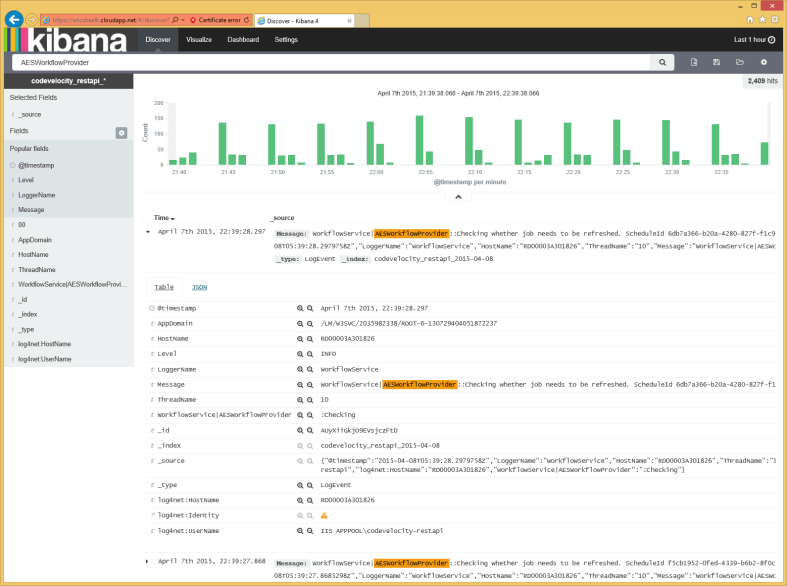
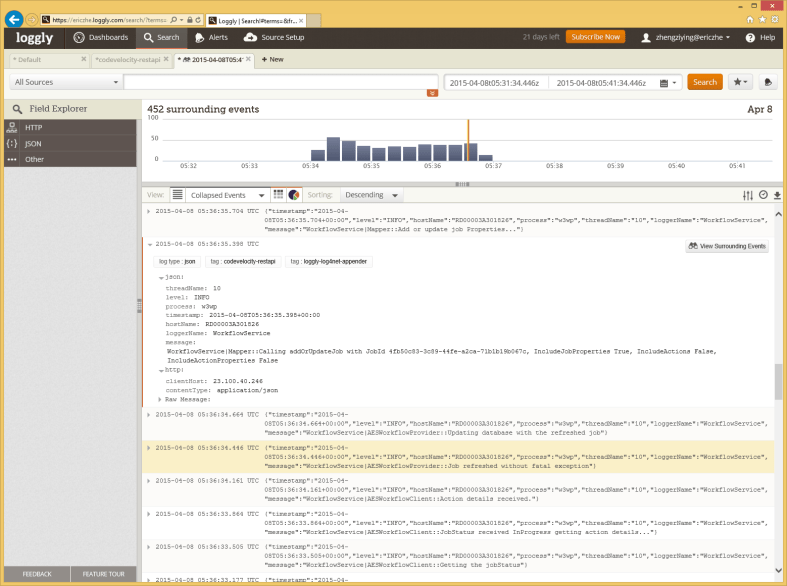
Loggly and Elasticsearch (Kibana) tied. Loggly’s UI is more like iPhone: it just works. It’s quite polished and easy to use for people who don’t want to spend a lot of time on learning the tool itself (rather than using the tool to conduct business). Elasticsearch/Kibana is like Android: it’s very powerful and you can get a lot out of it if you know how to configure it and tweak your application’s logging. The analogy is not surprising: both Android and Elasticsearch/Kibana are open source software, while iPhone and Loggly are closed source.
Loggly

Loggly UI

Elasticsearch

Elasticsearch/Kibana UI

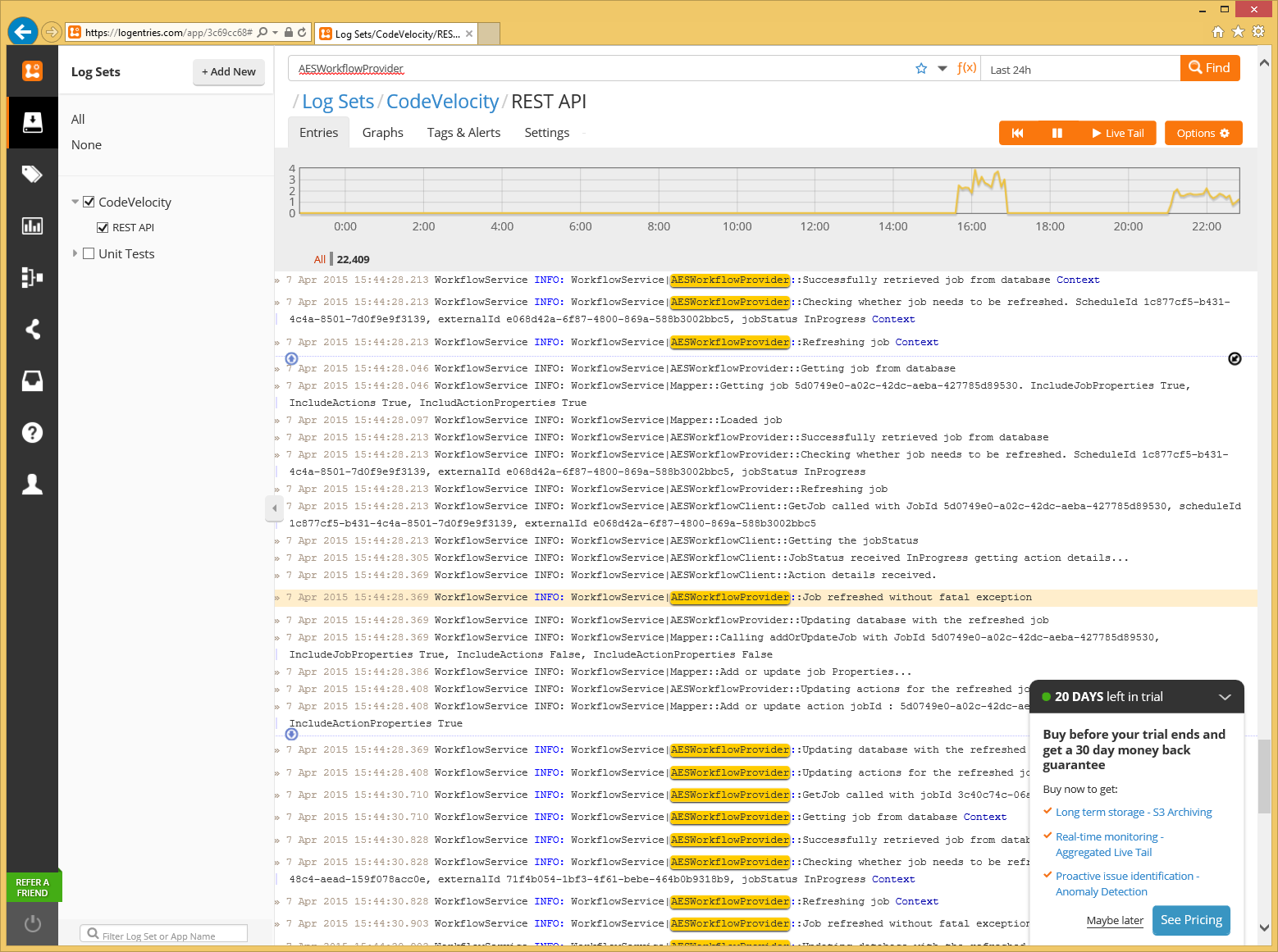
Logentries’ UI is less satisfactory. It was quite clear to me after a very brief use for 10 minutes or so. The design is relatively less fine-tuned. There seems to be some glitch in the client side scripts, so that sometime some UI elements were not very responsive or behaving in the expected way. In particular, there are three downers in Logentries’ UI:

  1. The row doesn’t expand inline. Both Loggly and Kibana can, which is sometimes pretty convenient.
  2. The results don’t support sorting. It’s always sorted by the event time ascendingly. It’s quite painful that every time that I have to press Page Down or drag the mouse many times to get to the latest rows. In the opposite, both Kibana and Loggly support sorting by time in either ascending or descending way and by default they both show the latest rows on top.
  3. The “X DAYS left in trial” reminder keeps popping up in Logentries UI. It’s intrusive and annoying. For a startup like them, they should understand that the greater conversion rate should organically come from building greater product.
Logentries

Logentries UI

.NET Support

Loggly and Logentries tied. They both provide official log4net appenders, which are also available as NuGet packages. Their official websites both provide clear app/web.config code examples of how to configure their appenders. Their appenders both work in asynchronous mode, so they can be directly used without noticeable performance overhead. A simple test shows that when their appenders are enabled, continuously calling logger.Info() for 100 times takes less than 100ms, which means <1ms per call.

Elasticsearch doesn’t provide official log4net appender, nor appender for Logstash. That’s a bit disappointing. There are a couple choices on GitHub though, among which log4net.ElasticSearch is the most well-developed one. In my project, I used log4stash, which was forked from log4net.ElasticSearch. But I had to do some work to log4stash before I can use it in my project, because log4stash doesn’t support SSL and my Elasticsearch is exposed on Internet so that my application running in Azure Websites can write logs into it (note: it seems Azure Websites recently started to support Virtual Network, which may eliminate the need to expose my Elasticsearch on Internet). It wasn’t too hard to add SSL support to log4stash, though. I did it in my fork, it worked well in my project and I created a pull request (which hasn’t been accepted yet). Anyone who needs a log4net appender for Elasticsearch with SSL support can grab it from my repo.

Official Documentation

Both Loggly and Elasticsearch’s official documentations are pretty good. No confusion.

Logentries has some room to improve. Take .NET support for example. There is a section on their official website and there is also a documentation on GitHub. The doc on their official website is using the older settings name (LOGENTRIES_TOKEN and LOGENTRIES_ACCOUNT_KEY), while the doc on GitHub uses newer setting names (Logentries.Token and Logentries.AccountKey).

Community & Ecosystem

Elasticsearch has clear winner, although the three were born nearly the same time: Elasticsearch since 2010 (although its root, Lucene, has been around for 16 years); Loggly since 2009; Logentries since 2010.

Search them in StackOverflow and you will get:

Searching them in GitHub:

It’s not surprising why Elasticsearch has a much bigger/active community: Elasticsearch is an open source software and self-hosted, while Loggly and Logentries are SaaS and closed source.

A plus for Logentries is that Logentries seems to provide better out-of-box integration with other services like Slack, HipChat, PagerDuty, etc. Loggly seems to have out-of-box integration with PagerDuty, but not HipChat or Slack. My quick search didn’t find any out-of-box integration of Elasticsearch with Slack, HipChat, etc., though I’m sure there are something ready for use in the community.

Cost

None of the three options is free, although Loggly and Logentries both offer a 30-day free trial period. After that, their entry level’s prices are:

Purely from cost saving perspective, if I were doing a side project, I would probably go for Logentries. In my current project, since Microsoft employees can use Azure for free (note: the charge goes to our department), a Linux VM running Elasticsearch+Kibana is for free to me.

Other Options

As mentioned this recent article, “Picking a cloud log management service”, there are a couple other choices for a SaaS log management service providers, such as: Splunk, Sumo Logic and Papertrail. I agree with that article that Splunk seems overkill for small projects and Sumo Logic doesn’t seem to fit. Papertrail looks a lot like Loggly and Logentries. I will give it a try when I get chance, though I don’t expect Papertrail to show too much difference than Loggly and Logentries.

Last but not least, none of the three big public cloud providers provide a comprehensive SaaS log management service as Loggly and Logentries do.

  • Amazon: AWS has the Amazon CloudWatch. But from what I read and confirmed by the Picking a cloud log management service article (written in Jan 2015), Amazon CloudWatch is only for EC2 instances.
  • Google: The recently announced Google Cloud Logging looks like a SaaS log management service, but relatively primitive, compared to Loggly, Logentries and Elasticsearch/Kibana. Plus, it seems to only support sending log from application in Google App Engine and VMs in Google Compute Engine.
  • Microsoft: Azure doesn’t seem to offer a log management service. Although a couple weeks ago as a part of the announcement of the new Azure App Service (which is kind of the v2 of Azure Websites), it provides the log collection, viewing and streaming.

It seems to be a common theme that Amazon, Google and Microsoft’s log management capability in their public cloud offering is only for the applications and VMs running in their own public cloud[1]. That kind of lack of openness is a bit disappointing.


[1] Update 04/12/2015: The logging in Azure Application Insights should work for any .NET applications. It provides a log4net appender as well as a listerner for System.Diagnostics.Trace.

Finding the Compatible SQLCMD.exe

I wrote this post because I hope it can save other people some time. When I ran into this issue this week, I searched in Bing/StackOverflow/etc. and couldn’t find a direct answer for it. So I spent some time to do my own troubleshooting, try different solutions and have figured out a workable one. This post captures the issue and my solution, so that hopefully in the future when other people run into the same issue, they will find this post by searching in Bing/Google.


The Issue

In my unit test’s TestInitialize code, it runs such a sqlcmd.exe command:

sqlcmd.exe -S (LocalDB)\UnitTest -E -d Jobs_DBTNXXVKQ3K6 -i "..\src\SQL Database\Jobs\Tables\Jobs.sql"

It works fine on my laptop, but it fails and returns below error when running in the build in Visual Studio Online:

HResult 0xFFFFFFFF, Level 16, State 1
SQL Server Network Interfaces: Error Locating Server/Instance Specified [xFFFFFFFF].
Sqlcmd: Error: Microsoft SQL Server Native Client 10.0 : A network-related or instance-specific error has occurred while establishing a connection to SQL Server. Server is not found or not accessible. Check if instance name is correct and if SQL Server is configured to allow remote connections. For more information see SQL Server Books Online..
Sqlcmd: Error: Microsoft SQL Server Native Client 10.0 : Login timeout expired.

That’s because this sqlcmd.exe was v10.0 (SQL Server 2008) and it’s incompatible with LocalDB, which was introduced in SQL Server 2012 (v11.0). Only the sqlcmd from SQL Server 2012 or later works with LocalDB.

The Solution

The solution is to find a later version of sqlcmd.exe on the build host of Visual Studio Online, and pinpoint to it in my TestInitialize code. This and this page listed what’s installed on the build host, but for obvious reasons, in my TestInitialize I must do a search instead of using a hard-coded path.

A little surprise was that to do the file search in the build host in Visual Studio Online, I couldn’t use the DirectoryInfo.GetFiles() method with the SearchOption.AllDirectories parameter. That would throw exception when it gets denied access to some folders and there doesn’t seem to be a way to let DirectoryInfo.GetFiles() just ignore any directory that it get access denied.

So I ended up writing a traversal by myself rather than using DirectoryInfo.GetFiles(). The traversal is kind of time consuming: it takes about 15-30 seconds on my laptop (probably because I’ve installed too many stuffs under the program files folder). So I added a shortcut: first try to look for it at a few known possible places; if found, then the time-consuming traversal can be saved.

Here is the full code for finding the compatible SQLCMD.exe:

/* Only v11.0 and later version sqlcmd.exe is compatible with SQL Server 
 * LocalDB. Unfortunately, at this moment, the default sqlcmd.exe in VSO
 * is v10.0. This method is to find a compatible sqlcmd.exe. It doesn't 
 * have to be the latest.
 */
private static FileInfo FindCompatibleSqlcmd()
{
  /* Try a few possible known places first. If found, it saves time in 
   * doing the full blown search. 
   */
  string[] knownPossiblePlaces = new string[]{
     @"C:\Program Files\Microsoft SQL Server"
     + @"\Client SDK\ODBC\110\Tools\Binn\SQLCMD.EXE"
    ,@"C:\Program Files\Microsoft SQL Server" 
     + @"\110\Tools\Binn\SQLCMD.EXE"
  };
  foreach (var file in knownPossiblePlaces)
  {
    if (File.Exists(file))
    {
      logger.LogInfo("Got a match in known places: {0}", file);
      return new FileInfo(file);
    }
  }

  /* Now do a full blown search, using code sample from
   * https://msdn.microsoft.com/en-us/library/bb513869.aspx
   */
  FileInfo answer = null;
  string[] paths = new string[]{
    Environment.GetFolderPath(Environment.SpecialFolder.ProgramFiles),
    Environment.GetEnvironmentVariable("ProgramW6432"),
    Environment.GetEnvironmentVariable("ProgramFiles")
  };
  foreach (var path in paths.Distinct())
  {
    Stack stack = new Stack();
    stack.Push(path);

    while (stack.Count > 0)
    {
      string currentDir = stack.Pop();
      string[] subDirs;
      try
      {
        subDirs = Directory.GetDirectories(currentDir);
      }
      catch (UnauthorizedAccessException)
      {
        logger.LogInfo("Access denied to folder: {0}" , currentDir);
        continue;
      }
      catch (DirectoryNotFoundException)
      {
        logger.LogInfo("Access denied to folder: {0}" , currentDir);
        continue;
      }

      string[] files = null;
      try
      {
        files = Directory.GetFiles(currentDir);
      }
      catch (UnauthorizedAccessException)
      {
        logger.LogInfo("Access denied to folder: {0}" , currentDir);
        continue;
      }
      catch (DirectoryNotFoundException)
      {
        logger.LogInfo("Directory not found: {0}" , currentDir);
        continue;
      }

      foreach (string file in files)
      {
        try
        {
          FileInfo fi = new FileInfo(file);
          if (fi.Name.Equals("sqlcmd.exe"
                            , StringComparison.OrdinalIgnoreCase))
          {
            logger.LogInfo("Found: {0}, created on {1}"
                           , fi.FullName
                           , fi.CreationTime);
            if (null == answer || answer.CreationTime < fi.CreationTime)
            {
              answer = fi;
              logger.LogInfo("Update answer to: {0}", fi.FullName);
            }
          }
        }
        catch (FileNotFoundException)
        {
          logger.LogInfo("File was just deleted: {0}", file);
          continue;
        }
      }

      foreach (string str in subDirs)
        stack.Push(str);
    }
  }
  logger.LogInfo("FindCompatibleSqlcmd result: {0}" 
         , answer == null ? "null" : answer.FullName);
  return answer;
}

I hope this will be helpful to somebody some day.

小胖子说 – 10

3/14/2015

小胖子看电视。

爸爸:我们设个timer吧
小胖纸:好的
爸爸:那设多少minutes呢?(之前小胖纸一直只会说six minutes的,所以我就让他说要看多久)
小胖纸:看thirty minutes吧
爸爸:好吧……爸爸言出必行……

小胖子说 – 9

3/7/2014

妈妈:明天什么计划
爸爸:去动物园
小胖纸:对!动物园很久没去了!
爸爸:还有飞火车(Monorail)
小胖纸:对,飞火车也很久没去过了
爸爸:那还有哪里很久没去过了呢
小胖纸:嗯… 英国!
爸爸:……… [擦汗][擦汗][擦汗]

小胖子说 – 6

1/31/2015

小胖纸现在习惯性跟我唱反调,我说要他就说不要,我说不要他就说要。今天我跟他说,

我:没关系,take your time, no rush
小胖纸:要rush!

(过了一会儿…)
小胖纸:爸爸,rush是什么东西?

小胖子说 – 5

1/30/2015

(明天小胖纸的幼儿园同学Derek要来家里玩)

我:明天你和Derek要吃什么?
小胖纸:Derek要吃hotdog,嘉嘉也要吃hotdog。
我:那嘉嘉的爸爸和妈妈吃什么呢?
小胖纸:嘉嘉爸爸、嘉嘉妈妈、Derek爸爸、Derek妈妈,都吃hotdog
我:那么Emily呢?(Emily是Derek的妹妹)
小胖纸(不假思索的):她不饿!

小胖子说 – 3

12/6/2014

我:为什么你喜欢吃薯条和薯片,但不喜欢吃这个土豆呢?可不可以谈谈你的想法?
小胖子:不好
我:什么叫“不好”?是你有想法但不想谈,还是没有想法
小胖子:没想法